
WP Engine Review 2026: Details, Pricing and Features
WP Engine Review research can get confusing because many hosting articles still show older WP Engine plans and pricing.
The current WP Engine website presents its Managed Hosting Platform through Essential, Core, and Enterprise, with Essential using a flexible capacity model based on websites, monthly visits, and storage.

WP Engine is a managed WordPress hosting platform powering 5 million websites. It combines enterprise-grade hosting, eCommerce solutions, newsroom publishing tools, and AI-powered features designed for performance, security, and scalability.
Pros
- Exceptional 24/7 support with outstanding first-contact resolution rates and dedicated account managers for enterprise customers.
- All-in-one ecosystem combining managed hosting, eCommerce tools, and publishing platforms to eliminate workflow friction.
- Enterprise-grade security with platform-level defense protecting revenue and reputation across all products.
- High performance at scale delivering fast, reliable experiences during peak traffic and global operations.
- Developer-friendly tools enabling smooth local development to production deployment with zero friction.
Cons
- Premium pricing makes entry costs higher than budget shared hosting alternatives for small bloggers.
- Steeper learning curve for non-technical users unfamiliar with managed hosting dashboards and workflows.
Starting with $26.25/mo
Get Started with WP EngineWP Engine focuses on managed WordPress hosting rather than general-purpose hosting. The platform handles WordPress, PHP, and MySQL management while adding staging tools, automated updates, backups, security features, CDN delivery, caching, and technical support.
Its current platform page reports 99.99% uptime and more than 200 global CDN points of presence.
The service also comes with a higher price than many basic WordPress hosts. Independent testing from TechRadar found strong support and a broad feature set, while its testing also found cheaper managed WordPress hosts and raised concerns about speed compared with some rivals.
So, what do you actually get for the money?
This WP Engine review looks at the platform from several angles, including performance, security, support, WordPress tools, pricing, ease of use, migration, and the areas where another host may make more sense.
WP Engine Review: At a Glance
A concise snapshot of WP Engine’s core features, pricing structure, and platform strengths for fast understanding in this comprehensive WP Engine review.
Category | WP Engine |
|---|---|
Hosting type | Managed WordPress hosting |
Current platform plans | Essential, Core, Enterprise |
Entry plan | Essential |
Core starting price | $400/month |
Enterprise pricing | Custom |
WordPress updates | Managed |
PHP and MySQL | Managed |
CDN | Included |
Caching | EverCache |
Staging | 1-click staging and development |
SSL | Included |
Backups | Included |
24/7 support | Yes |
DDoS protection | Available, with advanced protection on higher plans |
Managed WAF | Available on higher plans |
Uptime claim | 99.99% |
Global CDN locations | 200+ |
WP Engine’s current Essential plan starts with one website, 25,000 estimated monthly visits, and 10 GB of storage. Core supports 30 to 50 sites and 400,000 to 800,000 estimated visits per month, while Enterprise starts at 50+ sites and 800,000+ estimated visits.
What Is WP Engine?
WP Engine is a hosting company focused on WordPress websites.
That focus separates it from hosts that support dozens of platforms and give customers more control over the server environment.

With WP Engine, the hosting environment is built around WordPress. The company manages parts of the technical work behind the scenes, including WordPress, PHP, and MySQL updates. Its platform also includes tools for caching, CDN delivery, staging, backups, security, and site management.
WP Engine’s platform currently includes 1-click staging, EverCache, automated WordPress and PHP updates, a global CDN, DDoS protection, and managed WAF options.
This approach can appeal to businesses that want to spend less time maintaining hosting infrastructure.
It may be less attractive to developers who want complete control over a general-purpose server.
WP Engine Pricing Review
WP Engine’s current pricing is different from many older articles still appearing in search results.
The current Managed Hosting Platform uses three main plans:
Essential
Essential is the entry-level option. It uses a build-your-own capacity system rather than forcing every customer into one fixed package.
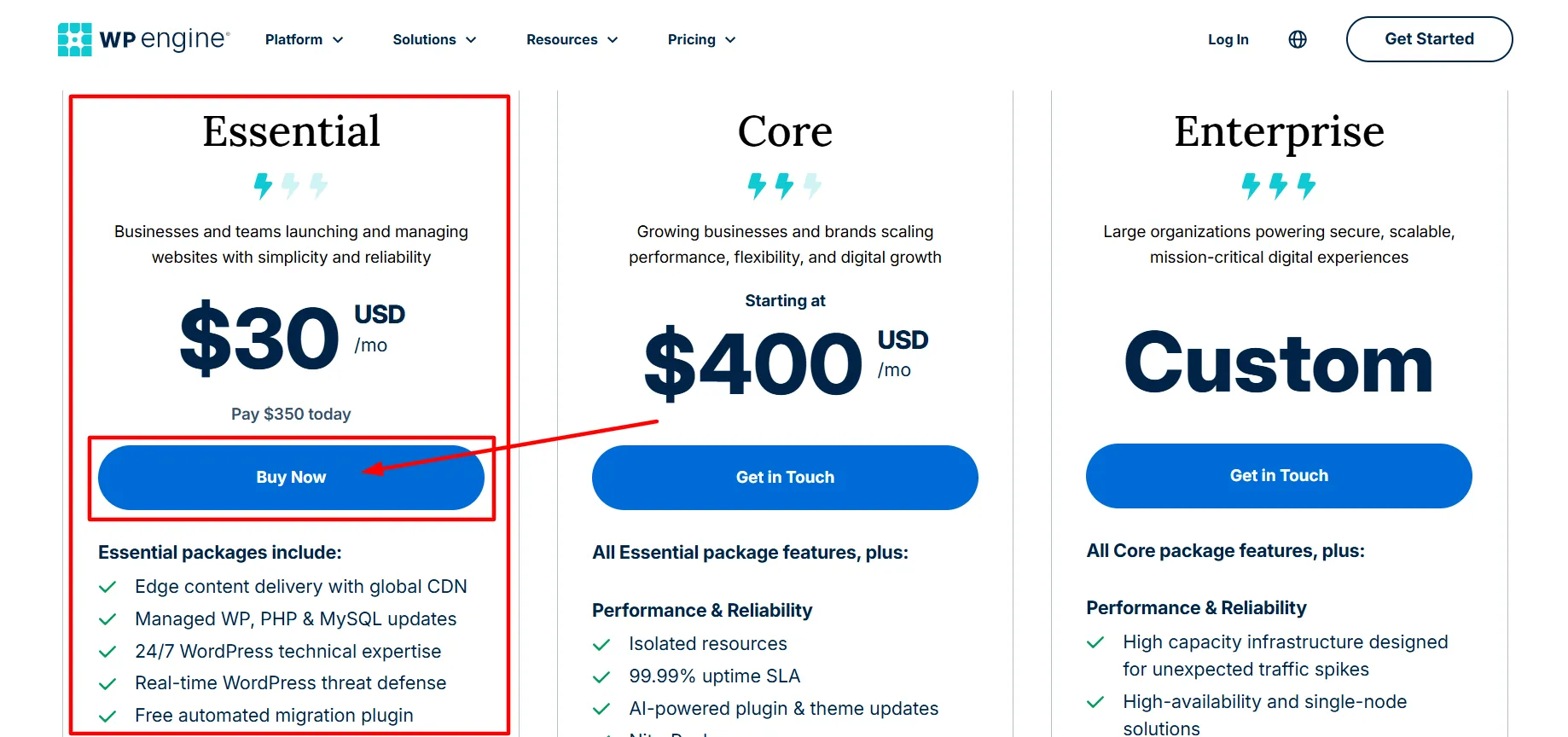
The available configurations currently range from:
1 site, 25,000 visits/month, 10 GB storage
Up to 3 sites, 75,000 visits/month, 15 GB storage
Up to 10 sites, 100,000 visits/month, 20 GB storage
Up to 30 sites, 400,000 visits/month, 50 GB storage
WP Engine also allows an additional site for $20 per month under the Essential structure.
Core
Core starts at $400 per month and targets higher-demand websites.
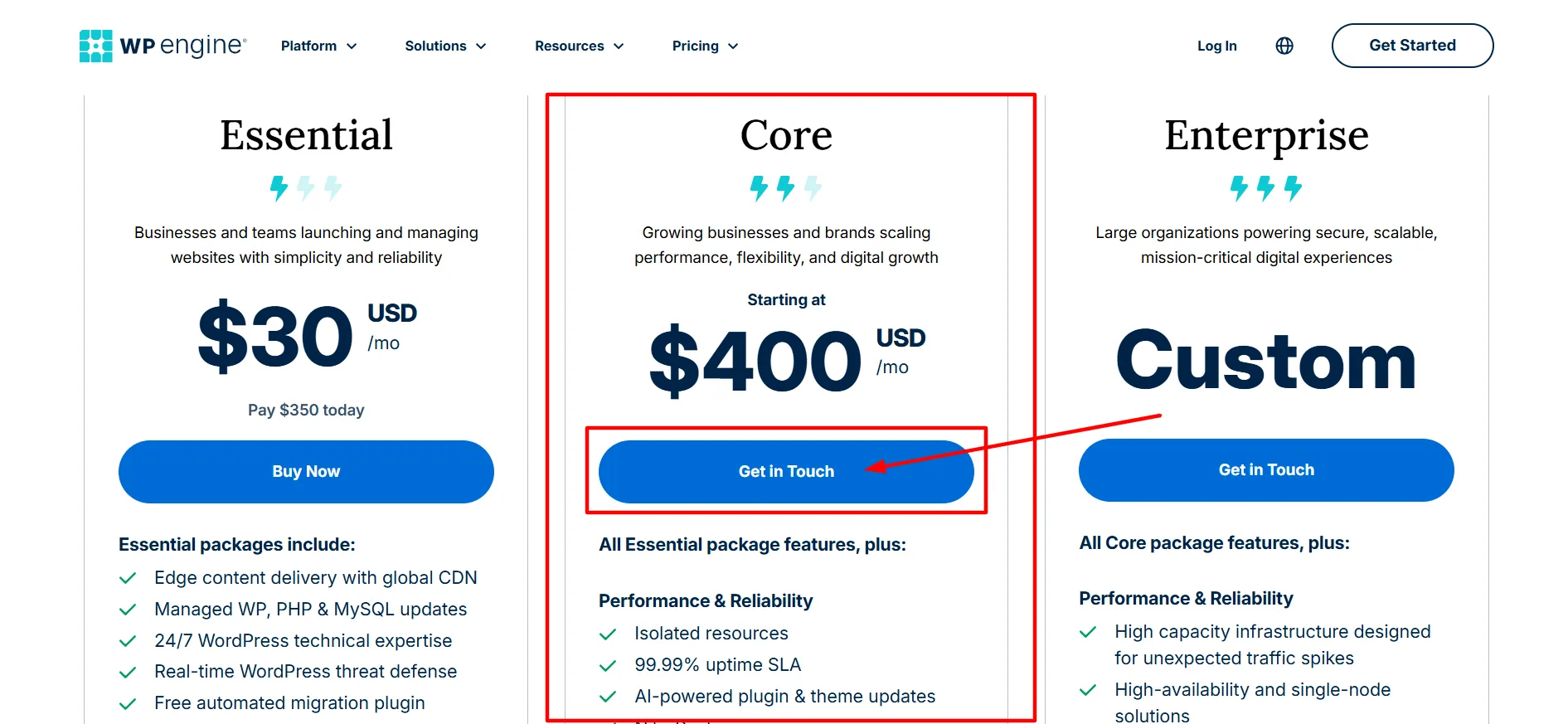
It supports 30 to 50 sites, 400,000 to 800,000 estimated monthly visits, and 50 GB to 2 TB of storage. WP Engine also lists isolated resources, managed migration services, AI-assisted plugin updates, priority support, and a 99.99% uptime guarantee for Core.
Enterprise
Enterprise uses custom pricing.
The current plan supports 50+ sites, 800,000+ estimated monthly visits, and 2 TB+ storage. It adds features such as SOC 2 Type II compliance, advanced DDoS protection, managed WAF, and a one-minute target response time.
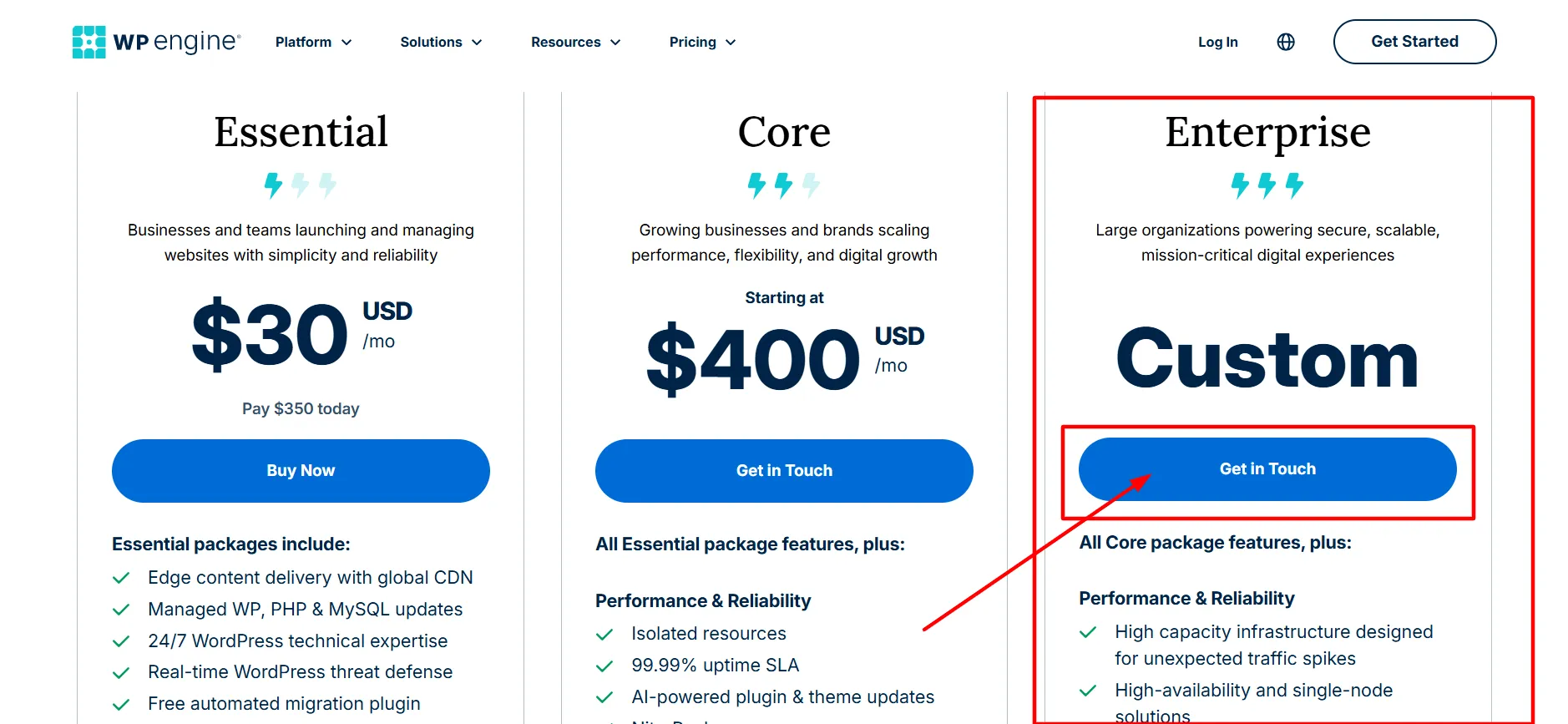
The current pricing page also advertises 20% savings on Essential with annual billing. First-year promotions apply only to eligible new Essential customers, and WP Engine states that renewal pricing can change.
WP Engine Performance Review
Performance is one of the main reasons people consider WP Engine.
The platform uses EverCache, WP Engine’s proprietary caching system, alongside a global CDN. WP Engine currently lists more than 200 CDN points of presence around the world. Its platform page also reports 99.99% uptime.
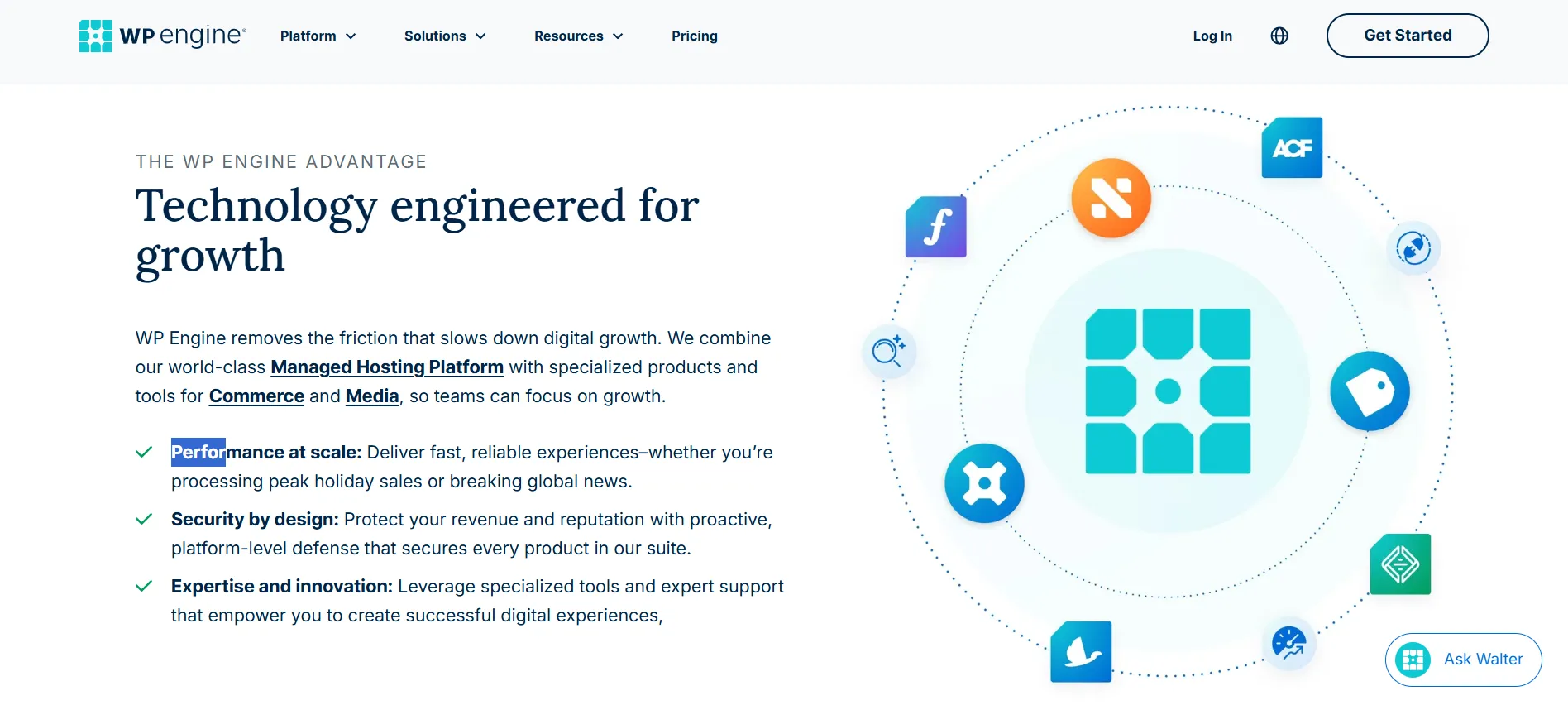
WP Engine says its infrastructure can handle WordPress sites as traffic increases, with containerized components covering areas such as WordPress, databases, and caching systems.
Those platform features are useful, but hosting performance should not be judged only by a company’s own benchmarks.
TechRadar’s August 2025 hands-on review gave WP Engine credit for its caching, CDN, Google Cloud infrastructure, and overall WordPress feature set. Its testing also concluded that WP Engine was not the fastest option it had tested and noted that cheaper managed WordPress hosting was available.
That distinction matters.
A WordPress site’s speed depends on more than its host. Theme quality, plugins, images, third-party scripts, database queries, and site architecture all affect loading times.
WP Engine Security Review
Security is another major part of WP Engine’s service.
The platform includes features such as:
SSL
Security patching
Plugin risk scans
DDoS protection
Managed WAF options
Automated WordPress and PHP updates
Backups
Secure hosting infrastructure
WP Engine’s current platform page reports that it blocked 244 billion malicious requests at the edge during Q1 2026. That figure is a company-reported platform statistic rather than an independent security test.
Enterprise customers receive additional security features, including advanced DDoS protection and managed WAF services. WP Engine’s current pricing page also lists SOC 2 Type II compliance for Enterprise.
For a business website, having security features managed at the hosting level can reduce the amount of technical work that falls on the site owner.
WP Engine Backup and Staging Features: WP Engine Review
One of the more useful parts of WP Engine is its staging setup.
The platform provides 1-click staging and development environments, allowing users to create a copy of a website, test changes, and push approved changes back to the live site.
This can be useful when you need to test:
WordPress updates
Plugin changes
Theme changes
New page layouts
Custom code
Database changes
It is much safer to test a major plugin update on a staging copy than to experiment directly on a busy production website.
WP Engine also includes backups as part of its managed hosting environment, which gives site owners another layer of protection when making changes.
WP Engine Support Review
Support is one of the areas where independent reviews have been positive.
TechRadar’s hands-on testing found WP Engine’s support agents quick and knowledgeable. It also praised the company’s support center for offering detailed guides and videos covering WordPress-related tasks.
WP Engine currently advertises 24/7 technical support on its Essential plan. Core includes priority support, while Enterprise adds a one-minute target response time.
G2 currently shows WP Engine with a 4.6 out of 5 rating from 388 reviews. Recent verified reviews published in 2026 mention responsive support, easy site management, straightforward setup, and site transfers. These reviews include seller-invited and incentivized reviews, so they should be read as customer feedback rather than independent performance testing.
TechRadar also found a weakness in its sales experience during testing. Its reviewers said sales representatives were not always clear about some agency hosting details.
That is a useful distinction: strong technical support does not necessarily mean every pre-sales question will receive the same level of technical detail.
WP Engine Migration Review
Moving a WordPress site can be one of the more stressful parts of changing hosts.
WP Engine provides a free automated migration plugin with Essential. Core includes managed migration services.

TechRadar tested a WordPress migration of around 500 MB and reported that the process completed within a few minutes during its test.
A real migration can take longer when a website has a large database, complex plugins, custom code, external services, or unusual server settings.
Still, having a dedicated migration tool removes some of the manual work involved in moving a WordPress website.
WP Engine Ease of Use
WP Engine is not designed like a basic shared hosting dashboard.
The platform includes tools for staging, development, backups, caching, security, site transfers, and WordPress management. That gives experienced users more control over their WordPress workflow.
It can also make the platform feel busy to someone who has never managed a WordPress site before.
TechRadar specifically noted that WP Engine’s large collection of features could intimidate newcomers.
For developers and agencies, those extra controls can be useful. For someone running a small personal blog, they may feel like more software than necessary.
WP Engine for Agencies
WP Engine has several features aimed at freelancers and agencies managing multiple websites.
The Essential plan can support up to 30 sites, while the platform includes transferable sites that let agencies build, design, and stage a site before transferring it to another account.

That workflow can be useful for client projects.
An agency can build the site, test it, make changes in staging, and then transfer the finished website without treating every client project like a completely separate hosting setup.
TechRadar also reviewed WP Engine’s agency plans and found differences in infrastructure between agency tiers. It recommended confirming the exact infrastructure and plan details with technical support before choosing an agency package.
WP Engine Developer Features: WP Engine Review
Explore advanced developer tools and features included with WP Engine in this WP Engine review, covering local development, staging environments, Git integration, and deployment workflows.
WP Engine’s current platform includes:
SSH access
Staging environments
Development environments
GitHub-related workflows
Transferable sites
Advanced WordPress management
Managed plugin and WordPress updates
The platform also includes Advanced Custom Fields and other WordPress-focused products within the wider WP Engine ecosystem, although some products are separate purchases.
This makes WP Engine more interesting for developers than a basic shared WordPress package.
Pros and Cons: WP Engine Review
Pros
- WordPress-focused hosting: The entire platform is built around WordPress.
- Managed updates: WP Engine manages WordPress, PHP, and MySQL updates.
- Staging: 1-click staging makes testing changes easier.
- Performance tools: EverCache and a global CDN are included.
- Security: SSL, security patching, plugin risk scans, and DDoS protection are part of the platform.
Cons
- Price: WP Engine costs more than many basic WordPress hosting services.
- Performance is not always the fastest: Independent testing from TechRadar found cheaper services that performed better in its tests.
WP Engine vs SiteGround and Kinsta
WP Engine is often compared with SiteGround and Kinsta because all three target WordPress users.
The differences become clearer when looking at how each company positions its service.
SiteGround competes across a broader hosting market and offers lower-cost entry plans. Kinsta focuses on managed WordPress hosting and emphasizes performance, developer tools, and Google Cloud infrastructure.
TechRadar’s 2026 web hosting guide describes SiteGround as a strong option for small businesses and Kinsta as a choice for agencies, with its Kinsta assessment focusing on performance and administrative controls.
TechRadar’s dedicated WP Engine review also compared WP Engine with Kinsta and SiteGround, noting that those providers can offer different combinations of price, performance, and features.
There is no useful one-size-fits-all answer here. A small business, WordPress agency, publisher, and high-traffic store can have very different hosting requirements.
Who Is WP Engine Best For?
Discover if WP Engine fits your needs in this WP Engine review, covering ideal users from small agencies and developers to established publishers and enterprises.
Business Websites
Businesses that rely on WordPress can benefit from managed updates, security tools, backups, staging, and technical support.
Agencies
Agencies managing multiple WordPress sites can use transferable sites, multi-site plans, staging, and developer tools.
Developers
Developers can use SSH, staging, development environments, and WordPress-focused tools rather than working with a generic hosting setup.
High-Traffic Websites
Core and Enterprise are built around larger traffic volumes, isolated resources, and higher hosting capacity.
A small website that receives little traffic may not need all of this.
If your main requirement is simply an inexpensive place to host a basic WordPress blog, a lower-priced provider may offer enough for your needs.
Is WP Engine Worth It? WP Engine Review
The answer depends on what you expect from WordPress hosting.
WP Engine is not positioned as the cheapest hosting service. Its pricing reflects a managed WordPress environment with built-in performance, security, staging, support, and maintenance tools.
The independent picture is mixed in a useful way. TechRadar praised WP Engine’s support and broad feature set but found cheaper managed WordPress hosts and did not find WP Engine to be the fastest service in its testing.
Current G2 feedback is more positive overall, with a 4.6/5 rating from 388 reviews. Recent reviewers mention support, ease of management, and site transfers as positives.
Since G2 reviews include seller-invited and incentivized submissions, they work best as one source of customer feedback rather than a standalone test of hosting performance.
For users who value managed WordPress tools and technical support, these features may matter more than finding the lowest monthly hosting price.
Quick Links:
WP Engine Review 2026: Final Verdict
This WP Engine Review shows a managed WordPress host built around site management rather than bare server space.
Its strongest areas are WordPress-specific maintenance, staging, caching, CDN delivery, security features, migration tools, developer access, and technical support. WP Engine’s current platform reports 99.99% uptime and more than 200 CDN points of presence.
The main drawbacks are price, the amount of functionality, and mixed independent performance results. TechRadar’s 2025 testing found that cheaper managed WordPress hosts were available and that WP Engine did not lead its speed tests.
The current pricing structure also deserves attention. WP Engine now presents Essential, Core, and Enterprise, rather than relying on the older Startup, Professional, Growth, and Scale structure that still appears in some older articles.
If you are comparing WP Engine with another WordPress host, look at traffic limits, storage, support, staging, security, renewal prices, migration help, and the features you will actually use. The cheapest monthly number rarely tells the whole hosting story.
For a business, agency, developer, or publisher that wants a managed WordPress environment, WP Engine has a broad set of tools worth testing. For a simple site where keeping hosting costs low is the main goal, a less feature-heavy provider may cover the required basics at a lower price.
